
Video Capture Card: Complete Guide for Live Streaming and Video Production

A video capture card is an essential device for live streaming, video recording, gaming, online teaching, webinars, and professional video production. It captures video and audio signals from a camera, gaming console, or other HDMI source and transfers them to a computer for streaming or recording.
For broadcasters and content creators, choosing the right capture card can improve video quality, reduce workflow complexity, and provide a reliable connection between professional video equipment and streaming software.
What Is a Video Capture Card?
A video capture card is a hardware device that receives an audio/video signal from an external source and converts it into a format that a computer or streaming system can process.
Depending on the model, a capture card may support HDMI, SDI, USB, 4K video, Full HD, high frame rates, and low-latency transmission. It can be used with streaming software such as OBS Studio and other professional production platforms.
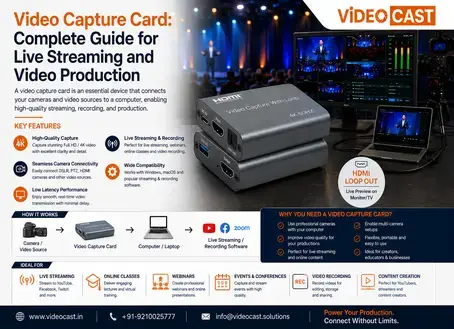
How Does a Video Capture Card Work?
The basic workflow is simple:
Camera / HDMI Source → Video Capture Card → Computer → Streaming or Recording Software
The capture card receives the video signal, processes or converts it, and sends the signal to the computer through an available interface such as USB or PCIe. The computer can then use the captured source for live streaming, recording, video conferencing, or production.
Key Benefits of a Video Capture Card
1. Professional Video Quality
A quality capture card can preserve high-resolution video signals for professional streaming and recording. Depending on the model, users can work with Full HD or 4K video capture.
2. Easy Camera-to-Computer Connection
Capture cards provide a convenient way to connect professional cameras, camcorders, switchers, and other video sources to a computer.
3. Low-Latency Video Capture
Low-latency capture is important for live production, gaming, interviews, online events, and interactive broadcasts where real-time monitoring is required.
4. Live Streaming Support
A video capture card can be used to bring an HDMI or SDI camera feed into streaming software, making it useful for YouTube, Facebook Live, webinars, corporate events, and professional broadcasts.
5. Video Recording
In addition to live streaming, captured video can be recorded on a computer for editing, training materials, presentations, podcasts, and archived content.
Applications of Video Capture Cards
Video capture cards are widely used across different industries and production environments.
Live Streaming: Connect professional cameras to streaming computers.
Gaming: Capture gameplay from consoles or PCs for streaming and recording.
Education: Support online classes, lectures, and training sessions.
Corporate Events: Capture presentations, meetings, and conferences.
Church & Worship: Connect cameras and production systems for live services.
Broadcast Production: Integrate cameras and video equipment with production computers.
Webinars: Bring high-quality camera feeds into conferencing applications.
Content Creation: Capture camera footage for YouTube, podcasts, and social media.
How to Choose the Right Video Capture Card
Before purchasing a capture card, consider the following factors:
Feature | Why It Matters |
Resolution | Determines whether the device supports Full HD, 4K, or other video formats |
Input Interface | Check compatibility with HDMI, SDI, or other video sources |
Frame Rate | Important for smooth motion and high-quality live production |
Connection Type | USB capture cards are portable, while PCIe models are designed for desktop systems |
Latency | Lower latency is beneficial for real-time monitoring and interactive streaming |
Audio Support | Ensures synchronized audio and video capture |
Software Compatibility | Check compatibility with your streaming and recording software |
Pass-Through | Useful when you need to monitor the original signal while capturing it |
Video Capture Card for Professional Live Streaming
For professional live streaming, a capture card acts as a bridge between the video source and the streaming computer. A camera can be connected through HDMI or another supported interface, while the computer receives the signal through USB or PCIe.
This setup allows production teams to combine camera feeds with graphics, presentations, prerecorded videos, and other sources inside their streaming software.
When used with PTZ cameras, video switchers, wireless video transmitters, and streaming computers, a capture card can become an important part of a complete professional video production workflow.
Why Choose VIDEOCAST Video Solutions?
VIDEOCAST provides professional video production and live streaming solutions designed for modern broadcast and content creation environments. Its product range includes PTZ cameras, video switchers, wireless video transmission systems, PTZ controllers, video capture solutions, and other professional AV equipment.
A properly integrated VIDEOCAST production setup can help businesses, broadcasters, educational institutions, event teams, and content creators build an efficient workflow for live streaming and video production.
Conclusion
A video capture card is a practical solution for connecting external video equipment to computers for live streaming, recording, conferencing, and professional production. The right model should match your required resolution, input type, frame rate, latency, connectivity, and software workflow.
Whether you are building a home streaming setup or a professional broadcast environment, selecting a reliable capture solution can help create a smoother and more efficient production workflow.
Frequently Asked Questions
1. What is a video capture card used for?
A video capture card is used to transfer video and audio from an external source, such as a camera, gaming console, or switcher, to a computer for live streaming, recording, or video production.
2. Can a video capture card support 4K video?
Yes. Some professional capture cards support 4K video capture. However, supported resolution and frame rate depend on the specific capture card model.
3. Can I use a video capture card for live streaming?
Yes. A capture card can connect a camera or other video source to streaming software, allowing you to broadcast live content through supported streaming platforms.
4. Is a video capture card required for live streaming?
Not always. Many USB webcams and some network cameras can connect directly to a computer. However, a capture card is useful when you want to use HDMI/SDI cameras, professional video equipment, gaming consoles, or other external sources.
5. What is the difference between HDMI and SDI capture cards?
HDMI is commonly used for consumer, creator, and short-distance professional setups, while SDI is widely used in professional broadcast environments and is designed for reliable video transmission over longer cable runs.
6. Can a video capture card work with a PTZ camera?
Yes. If the PTZ camera provides a compatible output such as HDMI or SDI, it can be connected to a suitable video capture card for streaming or recording.
7. Can I use a capture card with OBS Studio?
Yes. Many USB and PCIe capture cards are recognized by popular streaming and recording applications, including OBS Studio. Compatibility should be checked for the specific capture card and operating system.
8. What should I look for when buying a video capture card?
Consider resolution, frame rate, input/output interfaces, latency, audio support, connectivity, pass-through capability, and software compatibility before choosing a capture card.


Comments