
Video Switcher for Live Streaming – Professional Multi-Camera Production Solution

Video Switcher for Live Streaming
Live streaming has become an important part of modern communication, entertainment, education, and professional video production. From corporate events and webinars to conferences, concerts, sports coverage, and online content creation, audiences expect smooth and engaging video experiences. A video switcher for live streaming plays an important role in managing multiple video sources and creating a professional live production workflow.
As live productions become more advanced, relying on a single camera is often not enough. Production teams need the flexibility to switch between different camera angles, presentations, graphics, and other video sources in real time. A professional video switcher helps bring all these sources together, giving operators better control over what viewers see during a live broadcast.
For modern production environments, features such as multi-camera switching, 4K video support, HDMI and SDI connectivity, low-latency processing, picture-in-picture, and multi view monitoring can make a significant difference in overall production quality.
What is a Video Switcher for Live Streaming?
A video switcher for live streaming is a professional production device used to connect and manage multiple video sources during a live broadcast. It allows an operator to select and switch between different video inputs without interrupting the live stream.
A typical live streaming setup may include multiple cameras, 4K PTZ Cameras, laptops, presentation systems, media players, or other video sources. The video switcher receives these signals and allows the production team to choose which source should appear on the final program output.
For example, a live conference may use:
Camera 1 for a wide-angle stage view
Camera 2 for a speaker close-up
Camera 3 for the audience
Laptop input for presentation slides
The operator can switch between these sources in real time, creating a more dynamic and professional viewing experience.
How Does a Live Streaming Video Switcher Work?
A professional video switcher works as the central control point of a multi-camera production system.
The video sources are connected to the available inputs on the switcher. The operator monitors these sources and selects the required input for the live program output.
A basic workflow can look like this:
Camera 1 + Camera 2 + PTZ Camera + Laptop, Video Switcher, Program Output, Streaming Computer / Encoder , Live Streaming Platform
Depending on the model, some advanced video switchers can also provide integrated video processing, audio mixing, recording, encoding, and direct streaming capabilities.
This makes a video switcher a valuable component for both small streaming setups and professional live production environments.
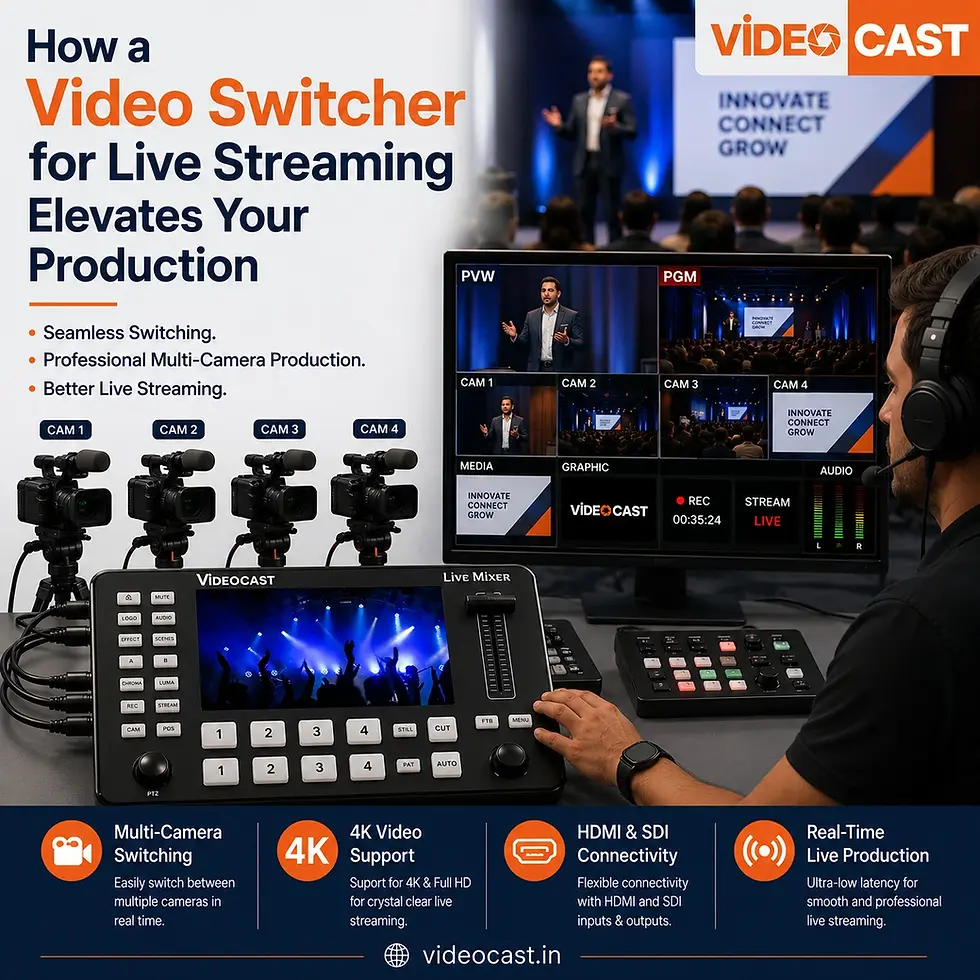
Why a Video Switcher is Important for Live Streaming
A professional live stream requires more than simply capturing video. When multiple sources are involved, production teams need a reliable way to manage and switch between them.
A video switcher for live streaming provides greater control over the production and helps create a smoother viewing experience.
Multi-Camera Production
One of the biggest advantages is the ability to manage multiple cameras and switch between different angles during live events.
Real-Time Switching
Operators can instantly switch between video sources, ensuring smooth and timely production flow.
Combine Video Sources
A video switcher can combine cameras, presentations, and media content into a single live output.
Key Features of a Video Switcher
Multiple Video Inputs
Feature | Why It Matters for Live Streaming |
Number of Video Inputs | Allows you to connect multiple cameras, PTZ cameras, laptops, and other video sources. |
HDMI & SDI Connectivity | Provides flexible connection options for different cameras and professional video equipment. |
Video Resolution | Supports high-quality Full HD or 4K video output for professional-looking live streams. |
Multi-Camera Switching | Lets you switch between different camera angles in real time for a more engaging broadcast. |
Multiview Monitoring | Allows operators to monitor multiple video sources and the program output on one screen. |
Audio Integration | Helps manage and combine audio sources for a smoother live production workflow. |
Streaming Compatibility | Ensures the video switcher works effectively with streaming computers, encoders, and live streaming platforms. |
Picture-in-Picture | Allows you to display a presenter, camera feed, or other content over the main video. |
Transition Effects | Adds professional cuts, fades, and other transitions between video sources. |
Recording Support | Allows live events, presentations, and broadcasts to be recorded for future use. |
4K Video Support | Provides higher-resolution video for professional live streaming and production workflows. |
Expandability | Gives you the flexibility to add more cameras and production equipment as your streaming setup grows. |
Video Switcher for Multi-Camera Live Streaming
Multi-camera production is one of the most common uses of a video switcher.
Example setup:
Camera 1: Wide shot
Camera 2: Close-up
Camera 3: Audience
Camera 4: Presentation screen
This setup is widely used in:
Corporate events
Conferences
Concerts
Sports events
Educational sessions
Live interviews
Video Switcher for Professional Live Events
Professional live events require stable and reliable switching systems.
Key features include:
Multiple HDMI/SDI inputs
4K support
Multiview display
Audio mixing
Low latency performance
Smooth transitions
VIDEOCAST Video Switcher Solutions for Live Streaming
VIDEOCAST provides professional video production solutions designed for live streaming and broadcast workflows.
Their video switcher systems help production teams manage multiple video sources efficiently and create flexible multi-camera workflows for different types of live productions.
What to Consider Before Buying a Video Switcher
Number of inputs required
Video resolution (HD or 4K)
HDMI or SDI compatibility
Multiview support
Audio features
PIP functionality
Future expansion needs
Why Professionals Choose Video Switchers
Better control over live production
Faster switching between cameras
Professional multi-camera output
Improved workflow efficiency
Centralized video management
Frequently Asked Questions (FAQs)
1. What is a video switcher for live streaming?
A video switcher is a device that allows you to connect multiple video sources and switch between them in real time during a live broadcast.
2. Why is a video switcher important for live streaming?
It helps manage multiple cameras and video sources, ensuring smooth transitions and professional-quality live production.
3. Can I use a video switcher for multi-camera setup?
Yes, video switchers are designed specifically for multi-camera live streaming and production environments.
4. Does a video switcher support 4K video?
Many modern video switchers support 4K resolution, depending on the model and specifications.
5. What is multi view in a video switcher?
Multiview allows you to see all video inputs and program output on a single screen for easier monitoring.
6. What is PIP in a video switcher?
PIP (Picture-in-Picture) allows one video source to appear inside another, commonly used in interviews and presentations.
7. Can I connect PTZ cameras to a video switcher?
Yes, PTZ cameras can be connected using HDMI or SDI inputs depending on compatibility.
8. What is the difference between HDMI and SDI switchers?
HDMI is commonly used for general production, while SDI is preferred for professional broadcast environments.
9. Is a video switcher useful for live events?
Yes, it is widely used in conferences, concerts, sports events, and corporate productions.
10. How do I choose the right video switcher?
Consider inputs, resolution, connectivity, audio features, and future expansion needs before selecting a model.
11. Who should use a video switcher?
It is ideal for content creators, broadcasters, event production teams, educators, and live streamers.
12. Where can I get professional video switcher solutions?
You can explore professional solutions from brands like VIDEOCAST that specialize in live production equipment.
Conclusion.
Conclusion
A video switcher for live streaming is a core component of modern multi-camera production. It allows seamless integration of cameras, PTZ systems, presentations, and media sources into a single professional workflow.
With features like HDMI/SDI support, 4K resolution, multi view monitoring, and advanced production tools, video switchers help create smooth, engaging, and professional live broadcasts.


Comments